Skip to content

For SEOs

Find the technical issues. Then actually fix them.

Audit tools tell you what is wrong and leave the fixing to a developer queue. ThemeSpot scans your HubSpot site, sorts every finding into a lane, drafts the fixes you approve and verifies each one with the rule that found it. Charged only when verified.

Scan
Pages
36 read
Findings
778 · 36 high
Safe to fix
drafted, verified, then charged
Needs you
decisions only you can make
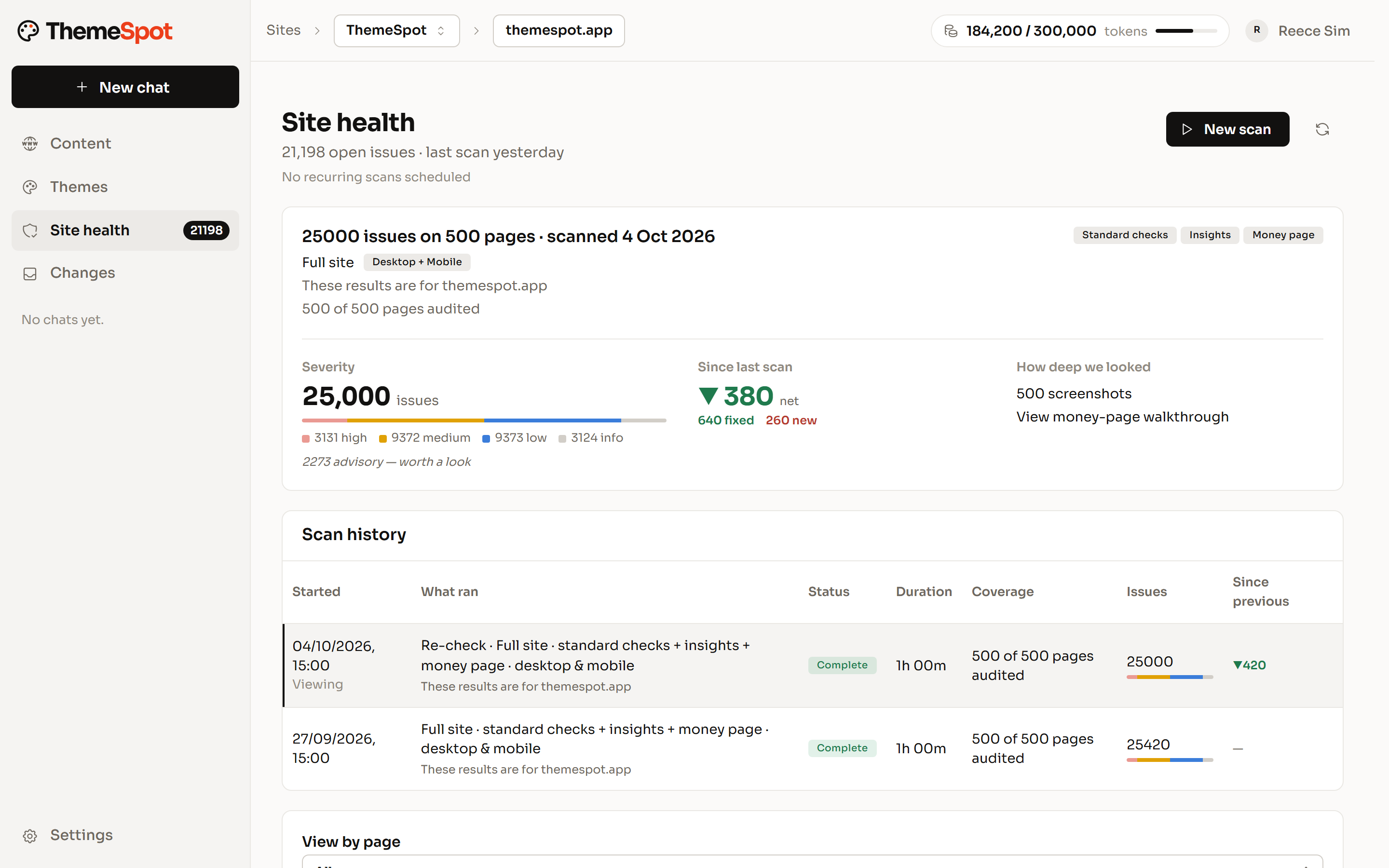
The site health summary: issues by severity, the net change since the last scan, how deep the scan looked with the money-page walkthrough, and the scan history.
  1. 1Severity at a glance
  2. 2Movement since the last scan
  3. 3How deep it looked
  • More than 80 deterministic checks on every page
  • A real browser through your money page
  • Fixes verified before they are charged

Audits that read the whole site.

Every page, every scan, the same rules.

  • Search and AI search

    Titles and descriptions, Open Graph, canonicals, hreflang, heading order, image alt and format; robots.txt access for AI crawlers, llms.txt, schema markup.

  • Links, content and brand

    Broken links and redirect chains, spelling in your English, placeholder copy, your own banned words and their replacements.

  • Speed, security and access

    Page weight budgets, third-party origins, Core Web Vitals, HTTPS and security headers, mobile viewport and touch targets, accessibility.

Issue triage you can act on.

Findings land in four lanes: Safe to fix, Needs you, Needs a look, Probably fine. Priority weighs impact, visibility and the money page against effort. Only a person can dismiss, and bulk changes are always confirmed. Theme-level findings are routed to a developer, never faked as content fixes.

  • Four lanes, one decision each
  • Priority from impact, visibility, money page and effort
  • Only a person dismisses
  • Theme findings routed, not hidden
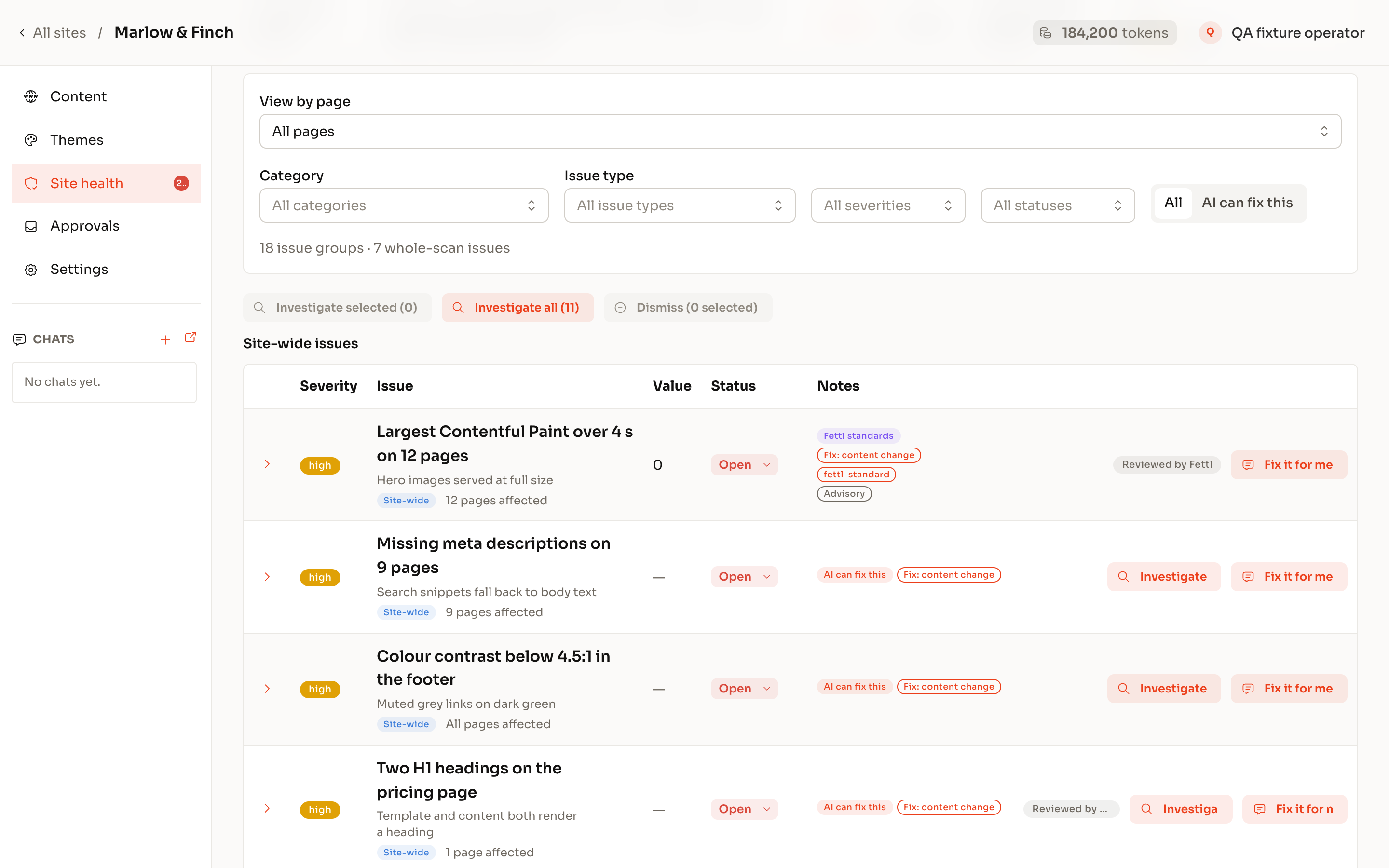
The site health findings: site-wide issues with their severity, status and notes, each with Investigate and Fix it for me.

Fixes, drafted and verified.

Ask for the Safe-to-fix lane and ThemeSpot quotes first, drafts each fix in the HubSpot editor and re-runs the rule that found it. Verified fixes are charged; anything else is refunded. Re-checks are free. A re-scan marks findings resolved by evidence, not by promise.

  • Quote first, up to 40 findings a run
  • Drafts, never live edits
  • Verified by the same rule, or refunded
  • Re-scan proves the result
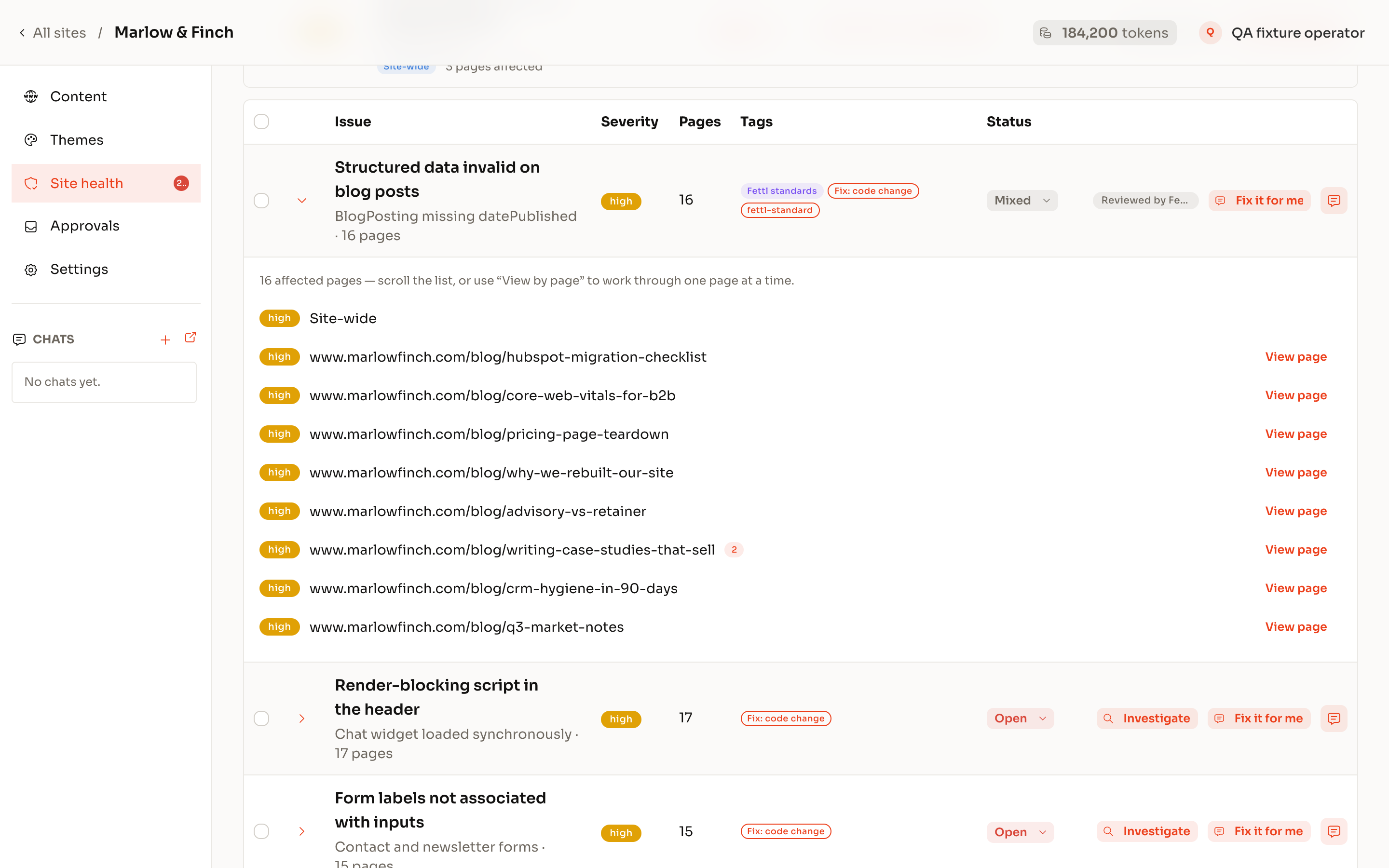
One finding opened: structured data invalid on 16 blog posts, every affected page listed with its severity, and Fix it for me.

Site management without the dev queue.

New landing pages from existing templates, title and description sweeps across the site, redirects written in bulk, images resized in place, forms and files named before they are touched. Ask in plain language; drafts land straight away; publishing waits for your approver.

  • Pages from templates, fields by path
  • Bulk edits sampled before they count
  • Redirects in bulk
  • Every edit journalled
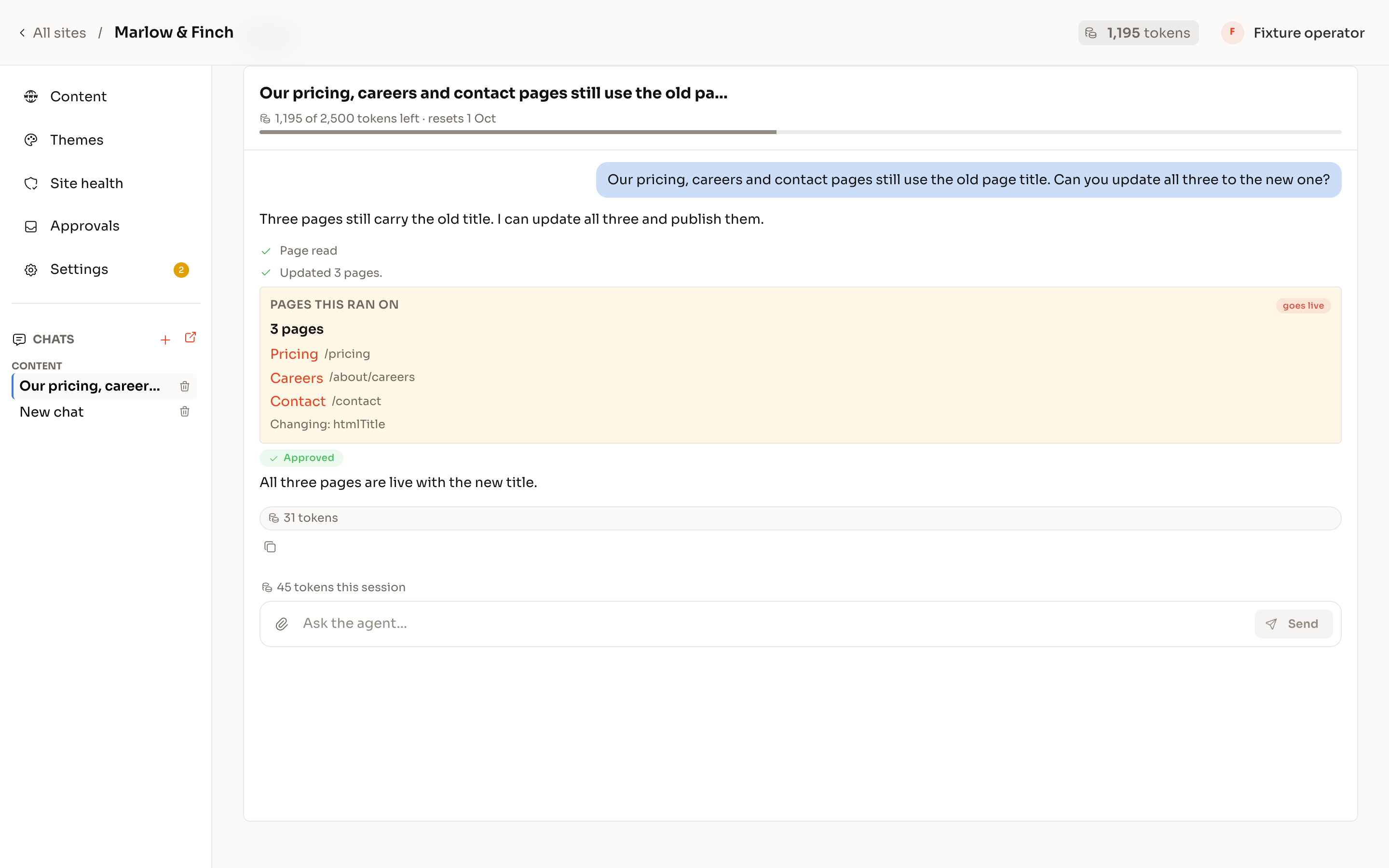
A chat asking to update the page title on the pricing, careers and contact pages: the three pages it ran on, marked approved, and all three live with the new title.

On every plan, for every role.

The same guardrails whether you are a developer, an agency or an SEO. Nothing reaches a live site without a named person approving it.

  1. Guardrails

    Drafts first. A person approves what goes live.

    Edits land as drafts in the HubSpot editor your team already uses. Publishing, redirects, forms, files and theme deploys queue for approval, with a plain-words description of what will happen and a journal of who approved what.

  2. User groups

    Roles for your team, a guest seat for each client.

    Your organisation owns its portals. Each person is an admin, manager, developer or viewer on each portal; the theme workspace is for developers. A client is a guest on their own portal and sees nothing else.

  3. End-client site management

    Hand the client a site they cannot break.

    Clients chat with their own site with code access off: pages, copy, images, redirects and forms, inside the theme you built. Theme changes stay with your developers.

  4. MCP

    Their own AI, on their own website.

    Connect ThemeSpot to Claude, ChatGPT or any MCP client. The same tools, the same approvals, the same roles: an AI the client already uses manages the site inside the guardrails you set.

You’re thinking: “We already have an audit tool.”
Fair. Here’s the answer:

Keep it. ThemeSpot’s difference is the second half: the fixes, drafted in HubSpot and verified by the rule that found them.

You’re thinking: “I don’t want AI editing a live site.”
Fair. Here’s the answer:

It does not. Every change is a draft; a named person publishes; redirects, forms and files are named before they are touched.

You’re thinking: “Our theme is locked or from the marketplace.”
Fair. Here’s the answer:

Content fixes work on any theme. Theme-level findings are reported and routed to a developer, not forced.

Connect your portal. See the first scan.

Free to connect. Fixes are charged only once they are verified.